| Client: | A prominent national broadcaster |
| Sector: | Broadcasting, AI, Data Analysis |
| My Role: | Product discovery from research to conception, visualization, and testing |
| Project Time: | 12 Months |
The AI-Based Audio Topic Detection System is an advanced solution designed to enable a national broadcaster to efficiently categorize and analyze large volumes of audio data in real time, specifically for categorizing their archive. This system leverages cutting-edge AI technologies to detect topics from audio broadcasts, providing accurate and immediate feedback to users, and offering semantic tagging for the videos.
Through this project, the broadcaster aimed to significantly enhance their content management capabilities, streamline operations, and improve the accuracy of both video and audio data analysis. The intuitive user interface and real-time processing features ensured that the system was both effective and user-friendly.
It should be noted that this project spanned over 12 months, during which I was deeply involved in the discovery phase and served as a consultant. My responsibilities included conducting user research, creating wireframes and prototypes, and performing extensive user testing. This comprehensive involvement allowed me to deepen my expertise in user experience design and apply innovative approaches to digitizing audio and video content management in the broadcasting sector.
Target Audience

Video sharing User-generated content Iranian YouTube

Customer calls telecommunication High-quality service

Vehicle manufacturer Cars and trucks Innovation leader
Timeline
- Phase 1: Initial Planning and Requirements Gathering (2 weeks)
- Phase 2: Research and Analysis (3 weeks)
- Phase 3: Design (4 weeks)
- Phase 4: Development (8 weeks)
- Phase 5: Testing (4 weeks)
- Phase 6: Deployment (2 weeks)
- Phase 7: Training and Support (3 weeks)
- Phase 8: Maintenance and Continuous Improvement (Ongoing)
Phase 1: Initial Planning and Requirements Gathering
1.1 Kickoff Meeting
Set the Goals and Objectives
- Documented project goals and objectives.
- Defined roles and responsibilities.
- Communication plan.
- Initial project timeline and budget overview.
1.2 Requirements Gathering
Workshops and interviews with stakeholders & Users
- Comprehensive list of user needs and expectations.
- Detailed documentation of user workflows and pain points.
- Functional requirements for file processing.
- Specifications for user interface design.
- Requirements for reporting and monitoring capabilities.
1.3 Feasibility Study
Technical Feasibility, Risk Assessment
- Outlining risks, challenges, and recommendations.
- Confirming the scope of work based on feasibility findings.
Interview Questions
-
General:
- What are your main tasks and workflows?
- What are the pain points in the current system?
- What features would make your tasks easier?
- How do you envision the new system improving your work?
-
Specific to File Processing:
- What file formats do you commonly use?
- How do you currently manage and process these files?
- What are the challenges you face with the current file management system?
-
User Interface:
- What kind of interface do you find intuitive and easy to use?
- What are the essential features you expect on the dashboard?
- How do you prefer to receive notifications and updates about file processing?
-
Reporting and Monitoring:
- What kind of reports do you need?
- How do you monitor the status and progress of your tasks?
- What details are important for you in the reports?
Result
-
Documented User Requirements and System Specifications:
- The system must manage and process a variety of audio and video file formats, including bulk and individual processing.
- The user interface should provide real-time updates and feedback on the status of file processing tasks.
- The system should support detailed tracking and management of file processing status, including file name, format, length, size, submission time, and current status.
- Essential user interface features include a submission panel, customizable settings, detailed reporting, and monitoring capabilities.
-
Feasibility Report Highlights:
- The technical feasibility study confirmed that the system could be developed to meet the outlined user requirements.
- Identified risks include technical constraints related to file format compatibility and processing speeds.
- Preliminary mitigation strategies involve using scalable architecture and robust testing frameworks
Phase 2: Research and Analysis
Surveys
Quantitative data on user needs and preferences
- Most common tasks you perform using the current system?
- Rate the ease of use of the current system on a scale of 1-10.
- What features do you find most useful in the current system?
- What features are missing or need improvement?
- How often do you use the system?
- What challenges do you face with the current system?
Interviews
Collect in-depth qualitative data.
- Can you describe your typical workflow when processing audio and video files?
- What specific tasks do you find most time-consuming or frustrating?
- How do you currently manage and track file processing tasks?
- What improvements would you like to see in the new system?
- How do you prefer to receive updates and notifications about your tasks?
- What kind of reports and data are crucial for your work?
Observational Studies
Understand the context of use and identify any unspoken pain points.
- Observe users as they interact with the current system.
- Take notes on user behavior, challenges, and workarounds.
Personas & User Journey Map
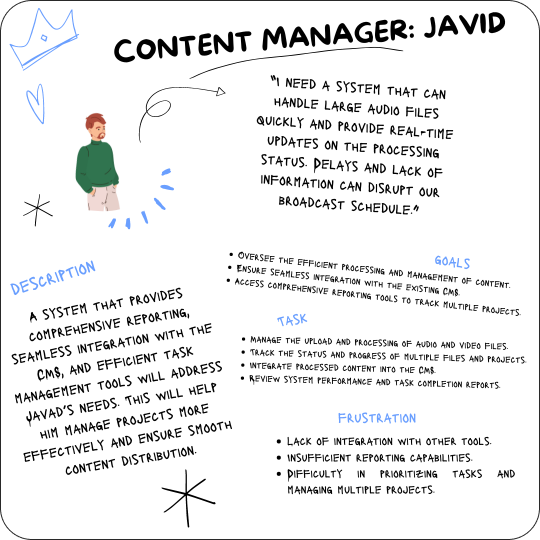
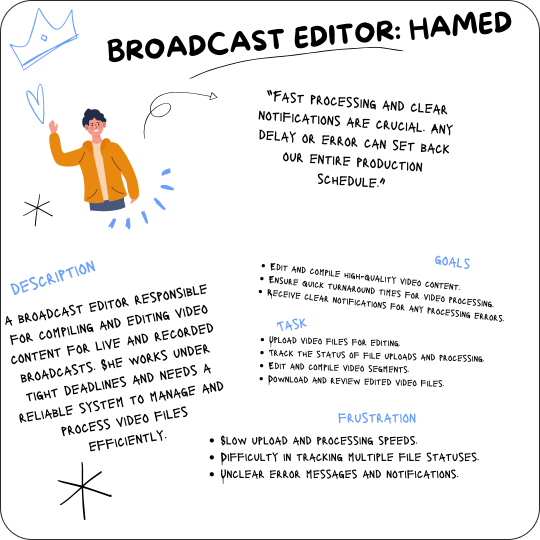
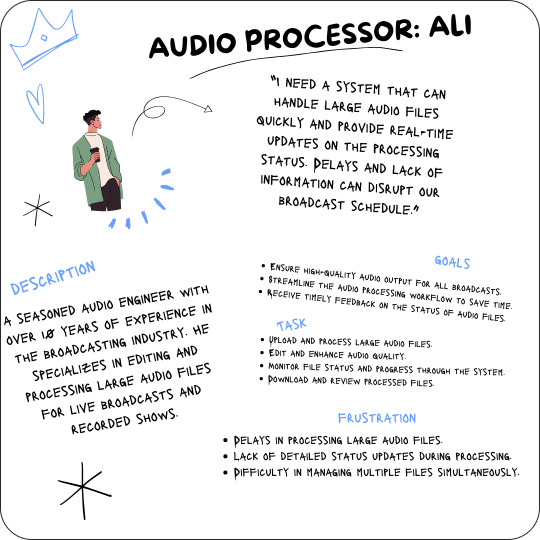
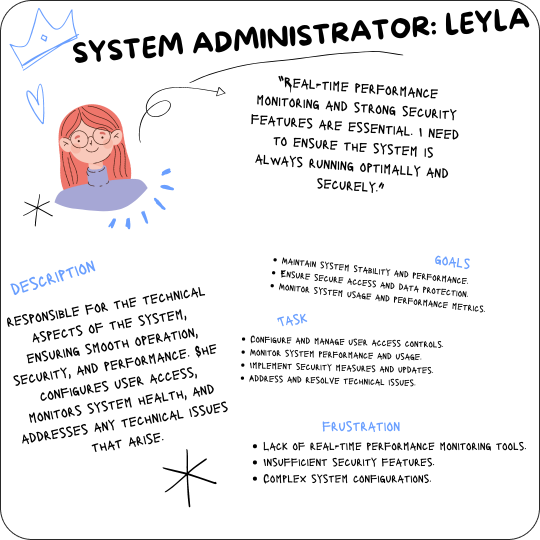
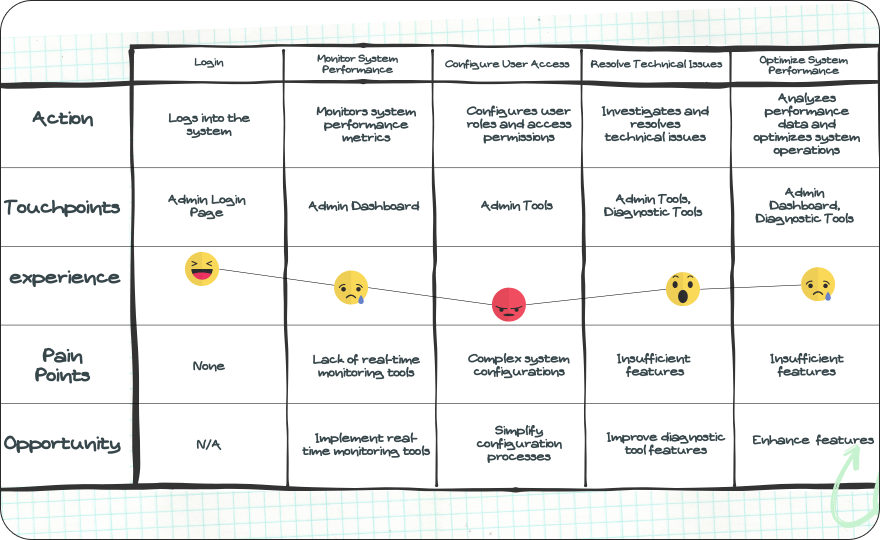
Feature List and Specifications
File Processing and Management
Support for Various Formats, Real-Time Feedback
- Handle different audio and video file formats including MP3, WAV, MP4, and AVI.
- Capability for bulk and individual file processing.
- Provide real-time feedback on file upload and processing status.
- Display progress bars and estimated completion times.
User Interface
Submission Panel, Customizable Settings, Real-Time Updates
- Intuitive panel for users to upload files and initiate processing.
- Drag-and-drop functionality for ease of use.
- Allow users to customize interface settings and preferences.
- Options for notification preferences and display settings.
- Display real-time updates on file processing status and notifications.
- Include clear and actionable error messages.
Reporting and Monitoring
Detailed Tracking, Comprehensive Reports, Performance Metrics
- Track the status of each file from upload to processing completion.
- Provide detailed logs of processing steps and any issues encountered.
- Generate reports on processing times, success rates, and system performance.
- Allow users to export reports in various formats (PDF, CSV).
- Monitor system performance metrics such as server load, processing times, and error rates.
- Real-time alerts for performance issues.
Integration
REST API Support, CMS Integration, Secure Data Exchange
- Provide REST API endpoints for integration with other systems and tools.
- Support for secure data exchange and user authentication.
- Seamless integration with existing content management systems (CMS).
- Automated categorization and accessibility of processed content within the CMS.
- Implement encryption for data transfer and storage.
- Ensure compliance with industry security standards.
Phase 3: Design
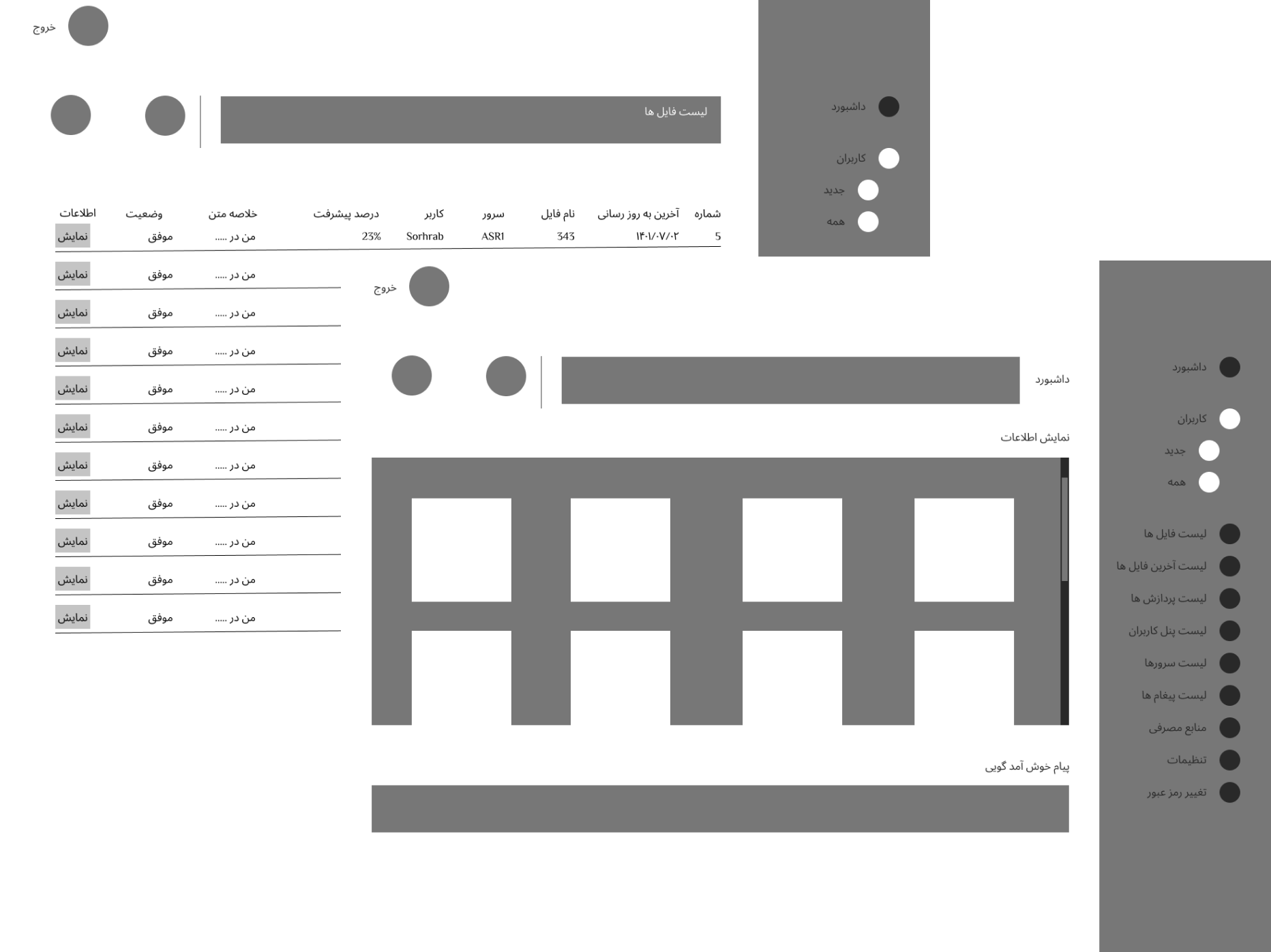
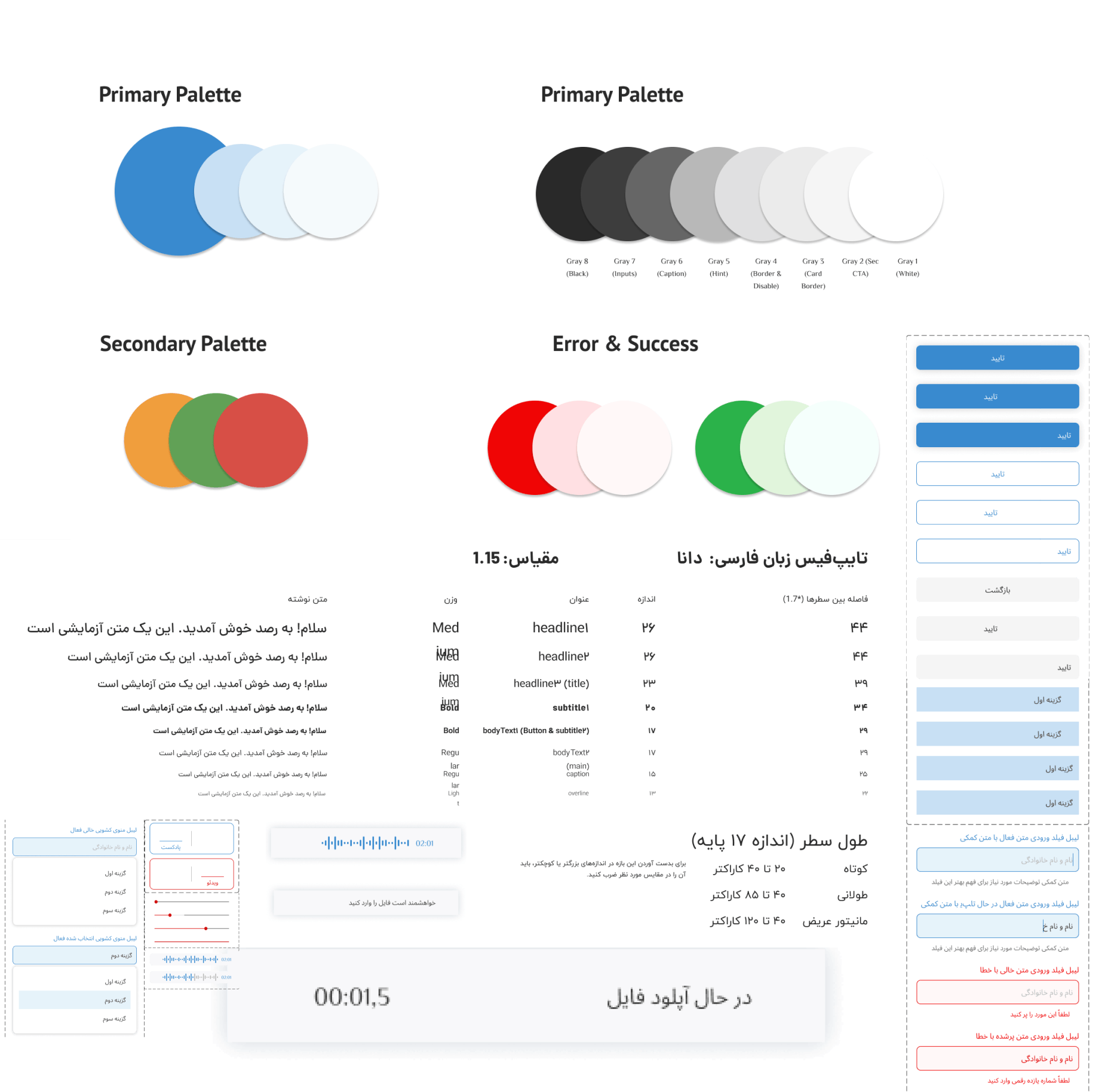
The visual design was developed by iterating from mood boards and style tiles to the UI kit and finally to creating a first version of the style guide.
Phase 4,5,6,8: Overview of the Development
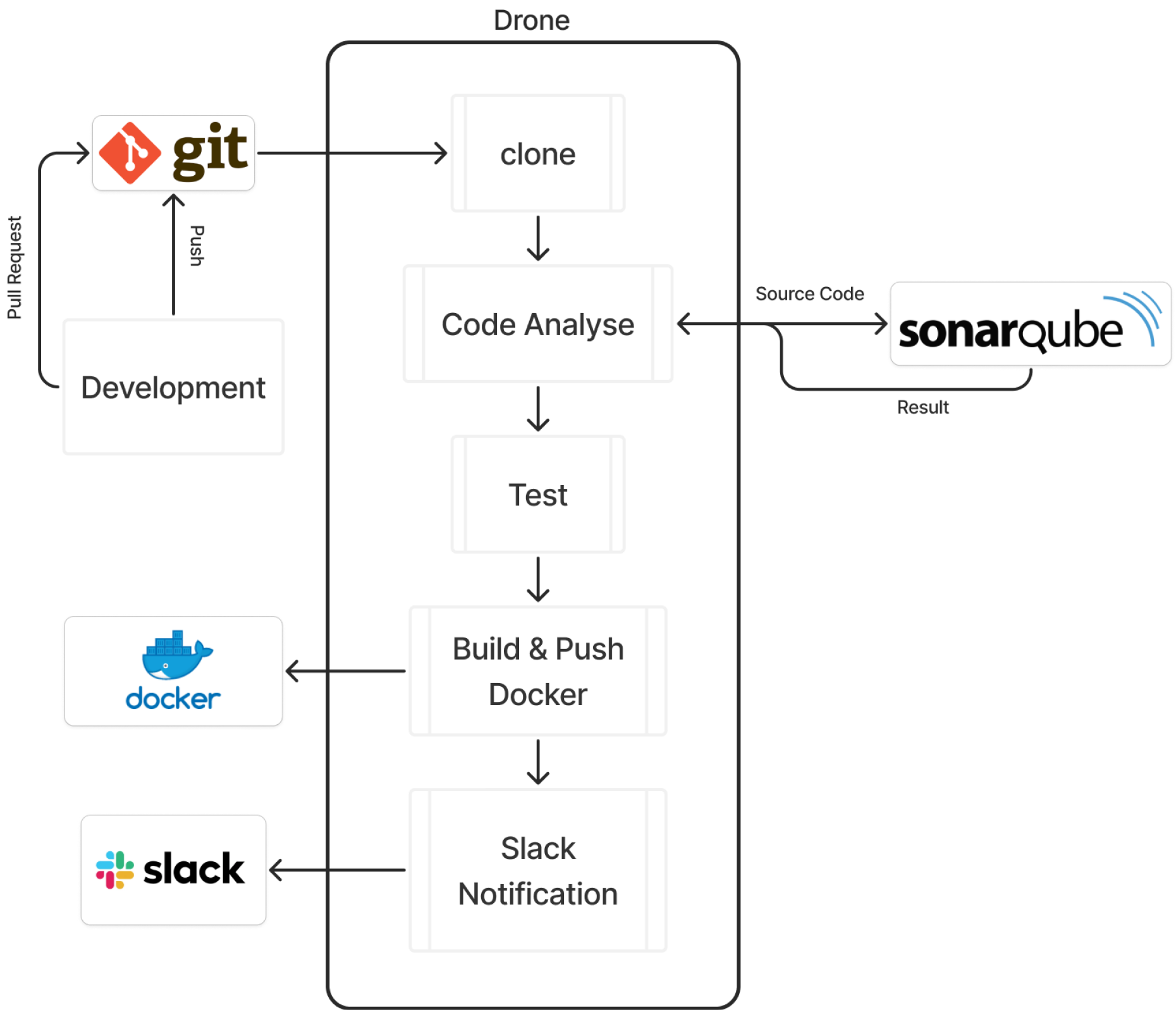
In Phase 4, the development team focused on translating the finalized designs into a functional system through a structured pipeline. The process began with code being pushed to a Git repository and proceeded through stages including cloning the repository, static code analysis with SonarQube, automated testing, and building and pushing Docker images. Notifications were sent via Slack to keep the team informed. This meticulous approach ensured seamless integration and robust functionality, leading to a fully operational system ready for deployment.
Phase 7: Training and Support
In this phase, we ensured comprehensive user onboarding and support through multiple channels. We prepared an onboarding document, created instructional videos on how to use the system, and conducted meetings with system operators to provide hands-on training. Additionally, we developed an FAQ section and other suitable documentation to assist users in becoming familiar with the system's functionalities and to address common questions and issues. This multi-faceted approach ensured that users were well-equipped to utilize the system effectively from the start.
Learnings
#1
Incremental Development Leads to Sustainable Progress
Tackling large, complex systems requires breaking down the process into manageable steps. This approach not only ensures steady progress but also allows for iterative improvements. By focusing on smaller, strategic developments, we can steadily build a robust system without overwhelming resources or stakeholders.
#2
Embrace Flexibility and Adaptability
Throughout the project, maintaining an open mind and being willing to adapt were crucial. Initial assumptions and ideas were frequently challenged by user feedback and evolving requirements. By staying flexible, we were able to refine the system to better meet the needs and expectations of the users.
#3
Comprehensive User Research is Invaluable
Engaging with end-users through surveys, interviews, and observational studies provided deep insights into their workflows and pain points. This user-centered approach ensured that the system's design and functionality were aligned with actual user needs, enhancing usability and satisfaction.
#4
Prioritize Clear Communication and Collaboration
Effective communication among stakeholders, developers, and end-users was essential for success. Regular meetings, detailed documentation, and an open feedback loop facilitated collaboration, ensuring that all parties were aligned and informed throughout the project.
#5
Importance of Thorough Testing
Robust testing processes, including unit tests, integration tests, UAT, performance testing, and security assessments, were crucial in ensuring the system's reliability and performance. Testing helped identify and resolve issues early, leading to a more stable and secure final product.
#6
Training and Support are Key to User Adoption
Providing comprehensive training materials and support systems was critical for user adoption and satisfaction. Tailored training sessions and accessible documentation empowered users to effectively utilize the system, reducing resistance and enhancing overall productivity.
#7
Continuous Improvement is Essential
The deployment of the system is not the end but the beginning of a continuous improvement process. Regular updates, continuous monitoring, and feature enhancements based on user feedback ensure that the system evolves to meet changing needs and maintains its relevance and efficiency.
#8
Stakeholder Involvement Drives Success
Involving stakeholders at every phase of the project, from initial planning to final deployment, ensured that the system met organizational goals and user expectations. Their input was invaluable in shaping the project direction and making informed decisions.
#9
Realistic Timelines and Expectations
Setting realistic timelines and managing expectations were critical for project success. By acknowledging potential risks and challenges early and planning accordingly, we were able to deliver a high-quality system within the agreed timeframe and budget.